In This Guide
- Quick answer: Absher registration vs activation (they are different)
- What Absher is and why you need it
- Registration step-by-step
- Activation: the critical second step (4 methods)
- Common errors and fixes
- What services become available once activated
- Managing dependents and language settings
- Edge cases and special situations
- Need help with Absher setup or activation?
Quick answer: Absher registration vs activation (they are different)
Absher registration is creating your account online (takes 10 minutes, free). Absher activation is the critical second step that unlocks access to 330+ Saudi government services (takes 5-15 minutes, multiple options available). Most people register fine but then get stuck on activation, not realizing they are two separate steps.
Here is the path from zero to fully activated:
| Step | Action | Time | Tools needed |
|---|---|---|---|
| 1. Register online | Create account with Iqama + password on absher.sa | 10 min | Saudi SIM, computer/mobile |
| 2. Verify OTP | Receive SMS code, enter on registration page | 2 min | Same Saudi SIM |
| 3. Activate account (pick one method) | Use kiosk / Nafath app / bank / Jawazat office | 5-15 min | Varies by method (see below) |
| Done | Log in and access 330+ services | Instant | Username + password |
The rest of this guide covers registration step-by-step, all four activation methods with their trade-offs, common errors and fixes, what services become available once activated, and how to manage dependents and language settings.
What Absher is and why you need it
Absher (the name means "The Easy Way" in Arabic) is the unified digital platform for all Saudi Ministry of Interior services. It is not just one service; it is the gateway to immigration, visa management, driving licenses, traffic fines, passports, family sponsorship, and 330+ other official services.
By the numbers: As of 2025, Absher has 28 million+ registered users and processed 448 million transactions in a single year (417 million on the Individuals platform alone). For any resident in Saudi Arabia, Absher is the most-used government platform.
Absher Individuals vs Absher Business: This guide covers Absher Individuals (for residents and visitors). Absher Business (Absher Aamal) is separate and is for employers managing employees' visas and residencies. Both platforms share the same infrastructure but have different services. If you are a business owner, you will register separately for Absher Business.
Who needs Absher: Any non-Saudi resident, visitor, or citizen in Saudi Arabia benefits from an Absher account. Expat workers, visiting professionals, families, students, and tourists can all register. The account is free and the only requirement is a Saudi mobile number (used to receive OTP messages).
Registration step-by-step
Registration is straightforward and takes about 10 minutes. You do not need to visit any office; everything is done online from your phone or computer.

- Go to absher.sa on any browser. You can use a computer or mobile phone. The site works on both.
- Click "New User?" or "Register" (usually at the top right). This takes you to the registration form.
- Select "Individuals" (not Business). Two options appear; confirm you are registering as an individual, not a business entity.
- Enter your Iqama number. The Iqama number is a 10-digit identifier on your residence card. It begins with a 2 for most non-Saudi residents. If you have a border number or national ID instead, use that.
- Enter your Saudi mobile number. This must be a number in your name (Iqama number) registered with STC, Mobily, Zain, or another local provider. This number will receive OTP messages for login and account recovery. International numbers do not work; you must have an active Saudi SIM.
- Enter your email address. This is used for account recovery and occasional notifications. Use your primary email. Do not use a temporary or work email you may lose access to.
- Create a username. Must be 8+ characters, letters and numbers only (no spaces, no special characters). Examples: "Ahmed2024" or "FatimaKSA". This is what you will use to log in alongside your password.
- Create a password. Must be 8+ characters, with at least one uppercase letter, one number, and one lowercase letter. Example: "MyPassword2024". Avoid passwords that are dictionary words or contain your Iqama number.
- Select your preferred language. Choose Arabic or English. You can change this later in settings.
- Read and tick the terms and conditions checkbox. The box confirms you accept Absher's terms of service and privacy policy.
- Complete the CAPTCHA verification. Solve the captcha (usually identifying objects in an image or typing distorted letters). This confirms you are human.
- Click "Register" or "Submit". The system sends a 6-digit OTP code to your Saudi mobile number.
- Enter the OTP. You have 5 minutes to enter the 6-digit code received via SMS. If the code expires, click "Resend OTP" and a new code will arrive.
- Confirm your registration. After entering the OTP, your account is created and you see a confirmation message. You are now registered, but not yet activated (that is the next section).
Worked example 1: Tariq registers in Riyadh. Tariq is a new expat who just received his Iqama (2234567890). He goes to absher.sa on his laptop, clicks "New User," selects "Individuals," and fills the form: Iqama 2234567890, Saudi mobile +966501234567 (STC, in his name), email tariq@gmail.com, username "Tariq2024," password "RiyadhExpat@2024." He selects English, ticks the terms box, solves the captcha, and clicks Register. He receives an SMS with code 482910. He enters 482910 on the confirmation screen. The system confirms: "Registration successful." But Tariq is not done yet, his account is not active. The services are still locked. That is the activation step (next section).
Common friction during registration: The most common error is using an international phone number (does not work; must be Saudi SIM). The second is having a mobile number not in your Iqama name (the SMS will not arrive). The third is creating a password that is too simple or does not meet the requirements (uppercase + lowercase + number required). If registration fails, wait a moment and retry. If it fails again, clear your browser cache and try again, or use a different browser.
Activation: the critical second step (4 methods)
Registration creates your account, but activation unlocks the services. Activation is a security step that confirms you are physically present or have a valid bank/app relationship with the government. You have four options; pick the one that matches your situation.
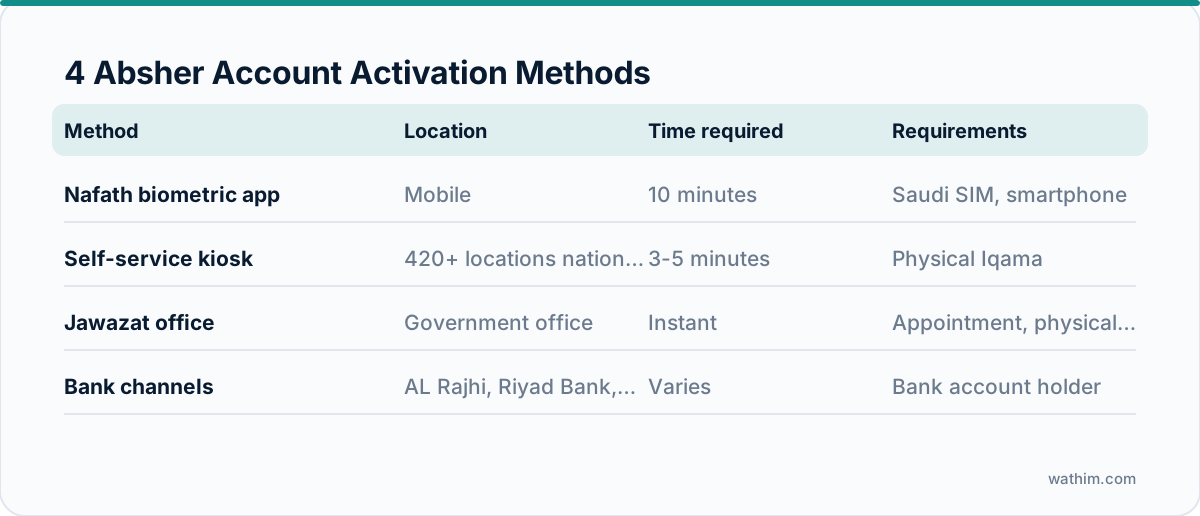
| Activation method | Location | Time | Requirements |
|---|---|---|---|
| Self-service kiosk | 420+ locations (malls, airports, govt buildings, Jawazat) | 3-5 min | Iqama card, Saudi mobile, Absher username/password |
| Nafath app (biometric) | Mobile (iOS/Android), anywhere | 10 min | Absher account created, smartphone with camera |
| Bank activation (online) | Online via bank portal (Al Rajhi, Riyad, SNB, AlBilad) | 5-10 min | Bank account with Saudi partner bank + online banking access |
| Jawazat office (in-person) | Any Jawazat branch | Instant | Physical Iqama card, appointment (optional but recommended) |
Method 1: Self-Service Kiosk (fastest, most accessible)
There are 420+ kiosks nationwide in malls, shopping centers, government buildings, Jawazat offices, and airports. The kiosk is a touchscreen machine that reads your Iqama card and confirms your biometric data (fingerprint).
- Find a nearby kiosk (Google "Absher kiosk near me" or check absher.sa for a kiosk locator).
- Insert your physical Iqama card into the card reader slot on the kiosk.
- The kiosk reads your data and asks you to enter your Absher username and password on the touchscreen.
- Place your finger on the biometric scanner (same fingerprint you registered with your Iqama).
- The kiosk confirms your identity and activates your account. A receipt prints (optional to keep).
Time: 3-5 minutes. No queue in most cases. Best for: anyone with a physical Iqama card and a nearby kiosk.
Method 2: Nafath App (biometric, no hardware needed)
The Nafath app (available on Apple App Store and Google Play) uses your phone's camera to scan your face and Iqama card. No kiosk visit required.
- Download the Nafath app (search "Nafath" in your phone's app store).
- Open the app and create a Nafath account (separate from Absher, uses your mobile number).
- In the Nafath app, find the "Activate Absher" option (sometimes listed under "Services" or "Government Services").
- Scan your Iqama card (both sides) using your phone camera, as instructed by the app.
- Take a selfie (face scan) when prompted. The app uses facial recognition to confirm your identity.
- Link your Absher account by entering your username and password into Nafath.
- Within 5-15 minutes, your Absher account is activated (the app will notify you).
Time: 10-15 minutes. Best for: people who want to stay home and do not have a nearby kiosk, or prefer not to carry their Iqama card out.
Worked example 2: Layla activates via Nafath. Layla registered her Absher account but is nervous about visiting a kiosk in a crowded mall. She downloads the Nafath app, creates a Nafath account (takes 3 minutes), and finds the "Absher Activation" option. She scans both sides of her Iqama using her phone camera (the app guides her step-by-step). She then takes a selfie and enters her Absher username/password into Nafath. The app says "Your Nafath is linked. Absher activation is processing." She waits 10 minutes and receives an SMS: "Your Absher account is activated." She logs into Absher and sees all 330+ services are now available. Total time: 15 minutes, no office visit.
Method 3: Bank Portal Activation (if you have a Saudi bank account)
If you have an account with Al Rajhi Bank, Riyad Bank, Saudi National Bank (SNB), or Bank AlBilad, you can activate Absher through your bank's online portal.
- Log into your bank's online banking portal or mobile app.
- Look for "Absher Activation," "Government Services," or "Activate Absher" (naming varies by bank).
- The bank will ask you to link your Absher account. Enter your Absher username.
- Confirm your identity through your bank's existing security (usually password, OTP, or biometric).
- The bank confirms the activation to Absher (usually instant or within a few hours).
Time: 5-10 minutes (online). Best for: people who already bank with one of the partner institutions and want to avoid visiting a kiosk.
Method 4: Jawazat Office (instant, official confirmation)
Walk into any Jawazat (Directorate of Passports and Residence) office with your physical Iqama and an officer will activate your account on the spot. Bring your Absher username and password.
- Go to the nearest Jawazat branch (every city has one).
- Tell the reception desk you want to activate your Absher account (say "Tafil Hesab Absher" in Arabic, or just say "Absher activation").
- An officer will log into Absher on a government computer, verify your Iqama, and activate your account. You do not even enter your password; the officer handles the technical side.
- You receive instant confirmation and can log in immediately.
Time: Instant (once you reach the desk, which may involve waiting in line 10-30 minutes). Best for: people who need immediate activation and do not mind visiting an office, or who are already at Jawazat for another service.
Common errors and fixes
Absher is reliable, but certain errors trap many users. Here are the most frequent and how to resolve them.
| Error message | What it means | Fix |
|---|---|---|
| "Account not activated" (services locked) | You registered but did not complete activation | Use one of the 4 activation methods above. Kiosk is fastest. |
| "OTP not received" during registration | Your Saudi mobile is not receiving SMS or the number is not in your Iqama name | Confirm your mobile is in your Iqama name with your telecom provider. Wait 2-3 minutes and click "Resend OTP." If still no SMS, try a different mobile number or visit an Absher kiosk to register. |
| "Username already exists" | Someone (maybe you in the past) already created this username | Use a different username (add numbers or change spelling). If it is your old account, use the "Forgot Password" link to reset and reuse the old username. |
| "Password does not meet requirements" | Password is too simple or missing required character types | Password must be 8+ characters with at least one uppercase, one lowercase, and one number. Example: "MyPass123". Avoid words in the dictionary. |
| "Invalid Iqama number" | You entered a wrong Iqama or border number format | Double-check your Iqama number (10 digits, starts with 2 for residents). Check your Iqama card or employment contract. If still unsure, ask your HR department. |
| "Login failed: account locked" | Too many failed login attempts (security measure) | Wait 24 hours for automatic unlock. To unlock sooner, click "Forgot Password" on login, verify your Iqama and mobile number, and reset your password. Then log in with the new password. |
| "Kiosk did not recognize my Iqama" | Your Iqama card may be damaged or the kiosk is faulty | Try another kiosk location. If another kiosk also fails, use the Nafath app or visit a Jawazat office instead. |
| "Nafath: face scan failed" | Poor lighting, blurry photo, or the app is struggling with face recognition | Try again in good natural light (sunlight or bright room). Hold your face steady and centered in the camera frame. If it fails a third time, switch to kiosk or Jawazat activation. |
| "Mobile number mismatch" (kiosk or app) | Your mobile number in your Iqama does not match the number you registered with | Update your registered mobile number with your telecom provider. Tell them your Iqama number and ask them to register the number in your name (takes 10 minutes at any telecom shop). Then try activation again. |
| "Expired Iqama" error during activation | Your Iqama has expired | You cannot activate Absher on an expired Iqama. Renew your Iqama with HR/Jawazat first. Once your new Iqama is activated in the system, activate Absher again. |
If you encounter an error not listed above, visit an Absher kiosk or Jawazat office where staff can troubleshoot in real time. Most activation problems are resolved in under 10 minutes once you sit down with a staff member.
What services become available once activated
Once your account is activated, you have access to 330+ government services, all from one digital platform. Here are the services expats use most frequently:
- Iqama and Residency Services: Check Iqama expiry date, apply for renewal, view residency status, check for huroob (absconding) flags.
- Passport Services: Track passport applications, apply for exit/re-entry visas, final exit visas, view passport status.
- Driving Licenses: Book appointments for licence conversion or renewal, view driving license status, check for traffic violations.
- Traffic Violations: Check traffic fines, pay fines, file objections to disputed violations, view demerit points.
- Family Services: Sponsor dependents, pay dependent family fees, manage family visa applications, track dependent statuses.
- Identity Card Services: Apply for or renew the Iqama card.
- Business Services (if registered separately): Absher Individuals does not cover this, but Absher Business handles visa applications for employees and company residency management.
For a full list of services and capabilities, log in to Absher and browse the "Services" menu. The platform is menu-driven and easy to navigate once activated.
Managing dependents and language settings
Can I add dependents to my Absher account? No. Each dependent (spouse, child, parent) must have their own Absher account using their own Iqama number. Spouses and children over 18 with their own Iqama can register and activate independently. For dependents under 18 or without their own Iqama, you (as the primary sponsor) handle services on their behalf through your account under the "Family Services" section.
Language settings: You can switch between Arabic and English at any time. Absher remembers your preference and logs you in to that language next time. To change the language, look for a language toggle (usually in the top-right corner of the page or in the settings menu). Both Arabic and English versions have full feature parity; no services are exclusive to one language.
Worked example 3: Fatima manages her family's Absher accounts. Fatima (a nurse in Jeddah) registered and activated her Absher account in English. Her husband Ahmed registered separately using his own Iqama and has his account in Arabic. Their son Khalid (age 19, on a dependent Iqama) also registered his own account and activated it via Nafath. When Fatima needs to check the dependent family fee, she logs into her Absher account (in English, as per her preference), goes to "Family Services," and sees her husband and son listed. She can see the dependent fee balance, pay it, and track it from her dashboard. Ahmed can do the same from his account (in Arabic). Their son Khalid's account is independent and shows his residency details, but as a dependent on Fatima's sponsorship, his Iqama renewal is initiated by Fatima (she sees the option in her Family Services).
Edge cases and special situations
You registered but lost your username and password
Click "Forgot Username" or "Forgot Password" on the Absher login page. The system will ask you to verify your identity using your Iqama number, email, or registered mobile number. You will receive an SMS or email with a reset link. Click the link, verify your identity again, and create a new password. Do not try to register again with a new account; that will create a duplicate and you will end up with two accounts.
You have changed your Saudi mobile number since registration
Update your registered mobile number with your telecom provider first (go to any STC, Mobily, or Zain shop with your Iqama, takes 10 minutes). Then go to Jawazat or an Absher kiosk and ask them to update your Absher mobile number on file. Alternatively, log into Absher and update the mobile number in your account settings (if the option is available in your version). New OTP messages will go to your new number.
You are registering but you do not have a Saudi SIM yet
You must get a Saudi SIM before you can register for Absher. Go to any telecom shop (STC, Mobily, Zain) with your Iqama and get a prepaid SIM registered in your name (takes 15 minutes, usually free or SAR 5-10). Once the SIM is active, you can register for Absher.
You are from a country with strict privacy laws (EU, etc.) and are concerned about data sharing
Absher's privacy policy is available on the website. Saudi Arabia does not have the same data protection regulations as the EU (GDPR), so if you are accustomed to European privacy standards, you should review the policy before registering. The data is used for government services and is not sold to third parties, but it is retained by the Ministry of Interior indefinitely.
Kiosk activation failed and the nearby kiosk is broken
Use the Nafath app (works from home) or visit a Jawazat office (guaranteed to work). Both alternative methods are as simple as kiosk activation and do not require the kiosk.
Need help with Absher setup or activation?
Setting up Absher is straightforward once you know the two-step process (register, then activate). If you are stuck on activation, locked out of your account, or unsure which activation method to use, the Absher team is reachable via the support option in the app itself, or you can visit an Absher kiosk where staff can activate your account on the spot. If you run into persistent errors or your Iqama status blocks account creation, contact us and we can clarify your situation and guide you through the process step-by-step.
Before you activate, line up the numbers you will need to handle inside Absher: use our Saudi Iqama cost calculator for renewal maths and the dependent fee calculator for the family bill. Activation is paired with Nafath for sign-in and unlocks Muqeem and Qiwa services in one flow.
Frequently Asked Questions
Registration creates your account online (10 minutes, uses OTP). Activation unlocks access to services (5-15 minutes, uses one of 4 methods: kiosk, Nafath app, bank, or Jawazat office). Both steps are required; registration alone does not give you access to services.
The kiosk method is the fastest if one is nearby (3-5 minutes). The Nafath app is second fastest (10-15 minutes) and requires no office visit. Both are faster than the bank method (5-10 minutes waiting + processing) and Jawazat (can take 30+ minutes due to office lines).
Yes. You must have a Saudi SIM registered in your Iqama name. The system sends OTP (one-time passwords) to this number. If you do not have a Saudi SIM, get one from any telecom shop with your Iqama before registering for Absher.
No. Your Iqama must be valid to activate Absher. If your Iqama is expired, renew it through your employer or Jawazat first. Once your new Iqama is activated in the system, you can then activate Absher.
No. Each person must register with their own Iqama number. Your spouse should register using their Iqama, and children over 18 with their own Iqama should register independently. Children under 18 without their own Iqama are managed through your Family Services section.
You completed registration but did not complete the activation step. Registration (OTP verification) is just step 1. Activation (kiosk/app/bank/office) is step 2. Go back and activate using one of the 4 methods, then you will have full access.
Make sure you are in good natural light (sunlight or bright indoor lighting). Hold your face steady and centered in the camera frame. If the app still fails after 2-3 attempts, switch to kiosk or Jawazat activation, both of which use biometric fingerprinting (not facial recognition).
You should have only one Absher account per Iqama number. If you accidentally created a duplicate, log in to one account, click Forgot Password on the other, and reset it to the same password so you have one active account. Having duplicate accounts can cause confusion and service delays.
Stuck on a Government Service Step?
Wathim publishes free plain-English guides to GCC visas, IDs, driving licences, attestation, and fines. If a fee table looks off or a step is missing, tell us and we will update the guide. You can also book a free guidance call with our GCC services desk.

Wathim Editorial
GCC Services Desk
The Wathim team writes plain-English guides to GCC government services. We track ICP, GDRFA, MOHRE, Absher, Muqeem, Qiwa, Metrash, LMRA, ROP Oman, and MOI Kuwait so expats can plan visa, residency, ID, and licence steps without guesswork.